tools for cross-platform reproducible development environments (macOS, Linux, WSL2)
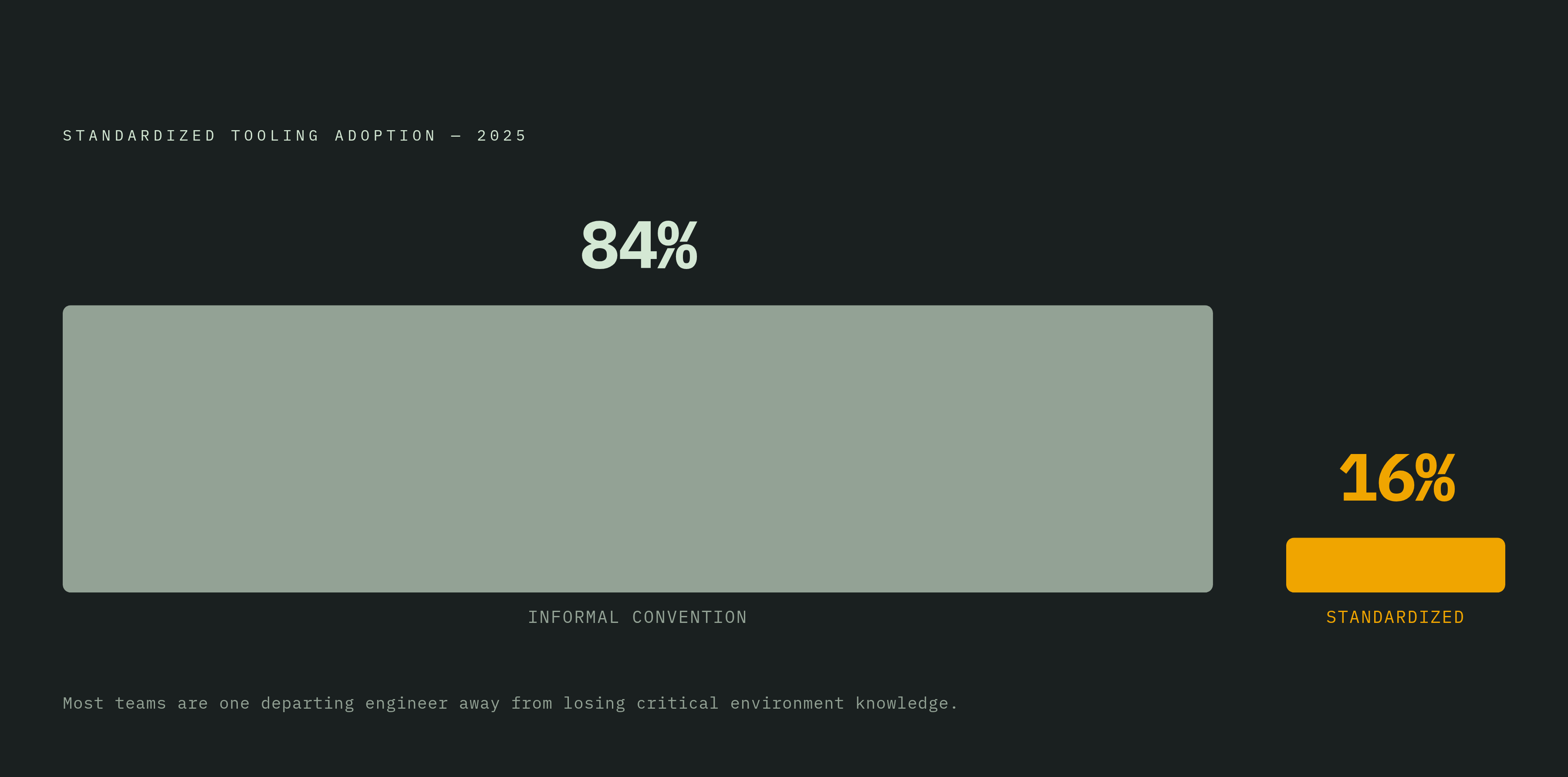
Only 16% of teams use standardized tooling to prevent environment drift across machines.

Environment drift is why "works on my machine" refuses to die, and it has nothing to do with discipline. Give developers no tooling that enforces consistency, and OS libraries, language runtimes, and CLI versions drift apart across laptops, CI runners, and production, quietly, until something breaks in staging or ships broken to a customer.
The costs show up on a spreadsheet if you look for them. A new engineer takes four to six weeks to reach full productivity, and a chunk of that time goes to chasing environment mismatches nobody wrote down because nobody knew they existed. A senior engineer on that same team eats fifteen to twenty hours per hire just answering setup questions, time that belonged to code review instead. When environments drift, dependency tracking gets patchy too. Software bills of materials go incomplete, and those blind spots are exactly where supply-chain problems hide until an auditor, or an attacker, finds them first.
A 2025 industry survey on development environments found that only 16% of organizations use standardized tooling consistently across teams. Roughly five out of six run on informal convention: a README two versions out of date, a Slack thread from eight months back, tribal knowledge that walks out the door with the one engineer who understood it. Stack the cross-platform reality on top of that: macOS on Intel and Apple Silicon, half a dozen Linux distributions, WSL2 on Windows, each with its own syscall surface and filesystem quirks. A setup that runs clean on one machine fails in ways nobody predicted on another. Before fixing any of this, it helps to pin down what "reproducible" actually means.
What reproducibility actually means across macOS, Linux, and WSL2
Reproducibility is a spectrum. The tool you pick decides which layer of that spectrum you're actually protecting.
At the shell level, reproducibility just means everyone has the same CLI tools and the same environment variables. Nothing below the shell gets touched, so a stray difference in a system library can still bite you. Process-level reproducibility isolates a dependency graph per project, so installing a package for one repo doesn't leak into another. Container-level reproducibility locks the OS libraries and filesystem inside an image, though the host kernel underneath stays shared with whatever else runs on that machine. Full-stack reproducibility is the strictest guarantee going: bit-for-bit deterministic builds from source, every transitive dependency included, verified by content rather than by name.
Platform differences make this messier than it sounds. macOS runs a Darwin kernel, so Linux binaries don't run natively there, and Apple Silicon versus x86_64 adds a second axis of variation on top of that. WSL2 runs an actual Linux kernel inside a Hyper-V virtual machine, which sounds like it should settle the question. Except filesystem performance falls off a cliff the moment you cross the Windows/Linux boundary: a repo living on the WSL2-side disk performs far better than that same repo accessed through a Windows path from inside WSL2. Linux itself isn't one thing either. glibc and musl behave differently, distributions put files in different places, and kernel version matters more than most people assume.
Here's a distinction that trips up a lot of otherwise careful engineers. Reproducing the environment spec, meaning the same packages get declared, is a different guarantee than reproducing the artifact, meaning the same bits get produced. Most tools deliver the former, and only Nix-based approaches get close to the latter. Take the floating-tag failure: a Dev Container built on node:20 with no digest pin can change on the next pull without warning. The spec file hasn't moved at all; the environment underneath it has. That's a configuration discipline problem the tool does nothing to prevent by default, and it stays relevant through everything that follows.
Container-based environments: what Dev Containers and Docker actually guarantee
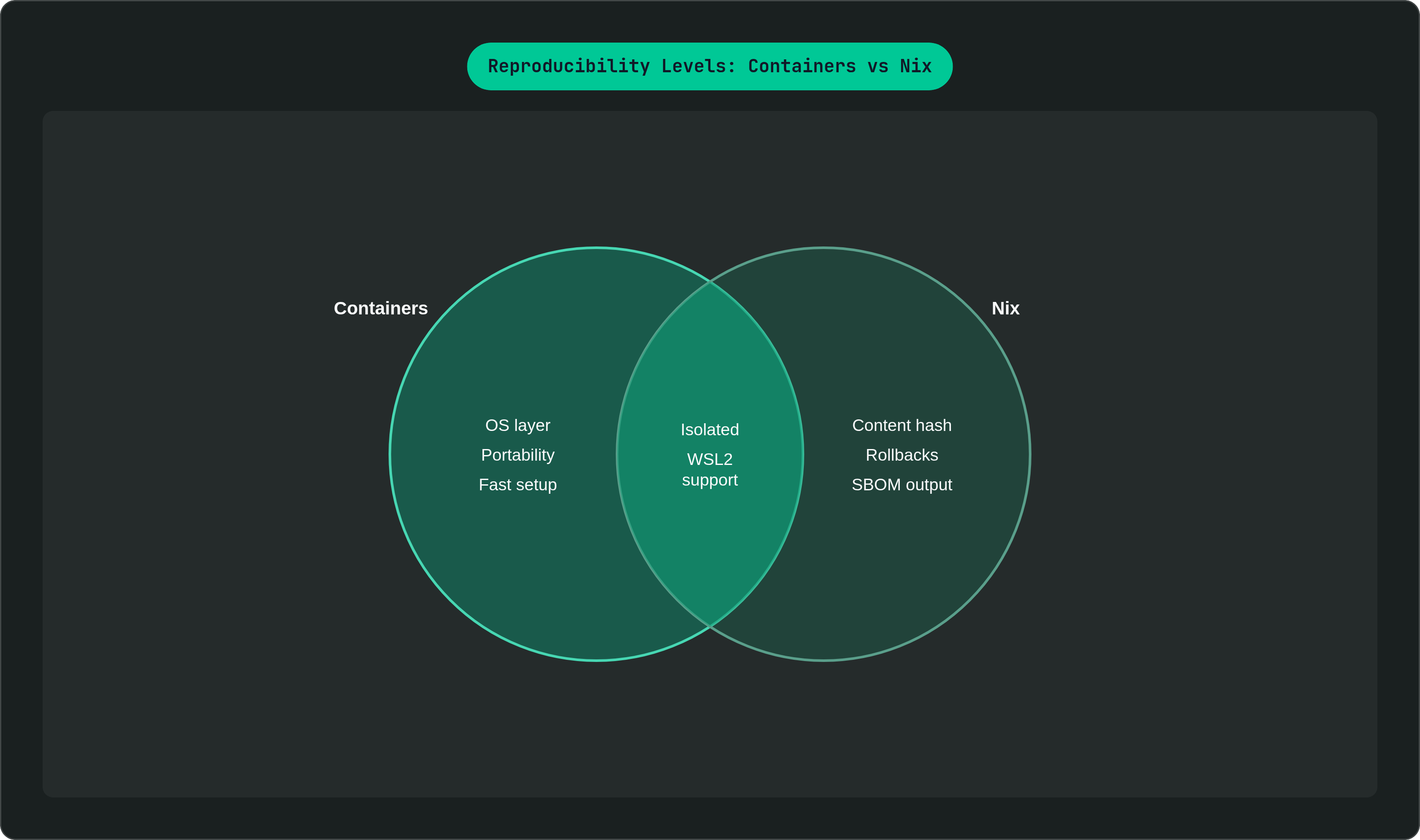
The Dev Containers spec, started by Microsoft and now used by VS Code, GitHub Codespaces, and JetBrains IDEs, defines a development environment inside a Docker container described by a .devcontainer/devcontainer.json file. Open the project and everyone drops into the same container image: same OS libraries, same installed tools, same environment variables. It works across macOS, Linux, and WSL2 as long as Docker or a compatible runtime is present, and the spec travels with the repository instead of living in someone's head.
Build-level reproducibility is a separate question, though, and containers alone don't answer it. Containers isolate at the OS layer, not the package layer. Run apt install in a Dockerfile with no version pins, and the image drifts between rebuilds even though the Dockerfile text hasn't changed a single character. The floating-tag problem shows up here too: reference node:20 instead of a digest-pinned image, and the environment shifts on the next docker pull with zero changes anyone could catch in review. The host kernel is always the container's kernel, and while that rarely bites during ordinary development, it matters the moment a workload depends on kernel-specific behavior.
A tool called DevPod extends the Dev Containers idea to run these environments locally on Mac, Linux, or WSL2, or remotely on any server. That gets closer to "consistent regardless of host" than a local-only Docker setup does. Cloud development environments push further still. GitHub Codespaces and JetBrains Fleet spin up a ready-to-code workspace in minutes instead of hours, and a 2024 Gartner survey on software engineering practices found 36% of engineering leaders reported that cloud development environments increased developer productivity.
None of this comes free. Docker Desktop licensing costs real money at scale, container startup adds delay to the daily loop, and running an IDE inside a container introduces friction that teams wanting something lighter notice fast. On macOS specifically, two alternatives deserve a mention. OrbStack plugs directly into the macOS filesystem, network stack, and terminal, and it's tuned for Apple Silicon with meaningfully less overhead than Docker Desktop on ARM. Lima runs lightweight VMs on Apple's native Hypervisor framework, supports several environments side by side, and skips the overhead of a third-party hypervisor entirely.
Containers solve the OS-layer problem well. They hand package-level reproducibility off to whoever wrote the Dockerfile, and that's the layer Nix was built to fix.
How Nix-based tools achieve a stronger guarantee than containers alone
Nix's core idea is that packages get built as pure functions of their inputs. Same inputs, same output, every time, with no global state quietly changing underneath you. Every dependency, including the transitive ones nobody thinks about until one of them breaks, gets pinned by content hash instead of a name-and-version string a registry could technically serve differently tomorrow.
Two developers on different operating systems, running nix develop against the same flake, end up with bit-for-bit identical toolchains, not just similar ones. Rollbacks are atomic: a bad dependency update doesn't mean reinstalling anything, it means pointing back at the previous generation. Projects don't bleed into each other either, since each one's environment lives fully isolated inside the Nix store rather than sharing global package state the way a system-wide pip install or npm install -g does.
Nix runs natively on macOS, both Intel and Apple Silicon, and on Linux, and it works on WSL2 because WSL2 hands it a genuine Linux kernel rather than an emulation layer. The cross-platform case is strong.
The catch is the learning curve, and calling it "steep" undersells it. Writing Nix derivations by hand means learning a functional language most developers have never touched in their careers. That's probably the single biggest reason teams look at Nix, nod at the reproducibility guarantee, and quietly walk away six weeks later having gotten no further than a broken shell.nix and a pile of Stack Overflow tabs. The ecosystem has spent the last several years building abstraction layers to fix exactly this, each one trading away some of Nix's raw power for a lot more approachability.
The Nix abstraction layer: Devbox, devenv, Flox, and direnv compared
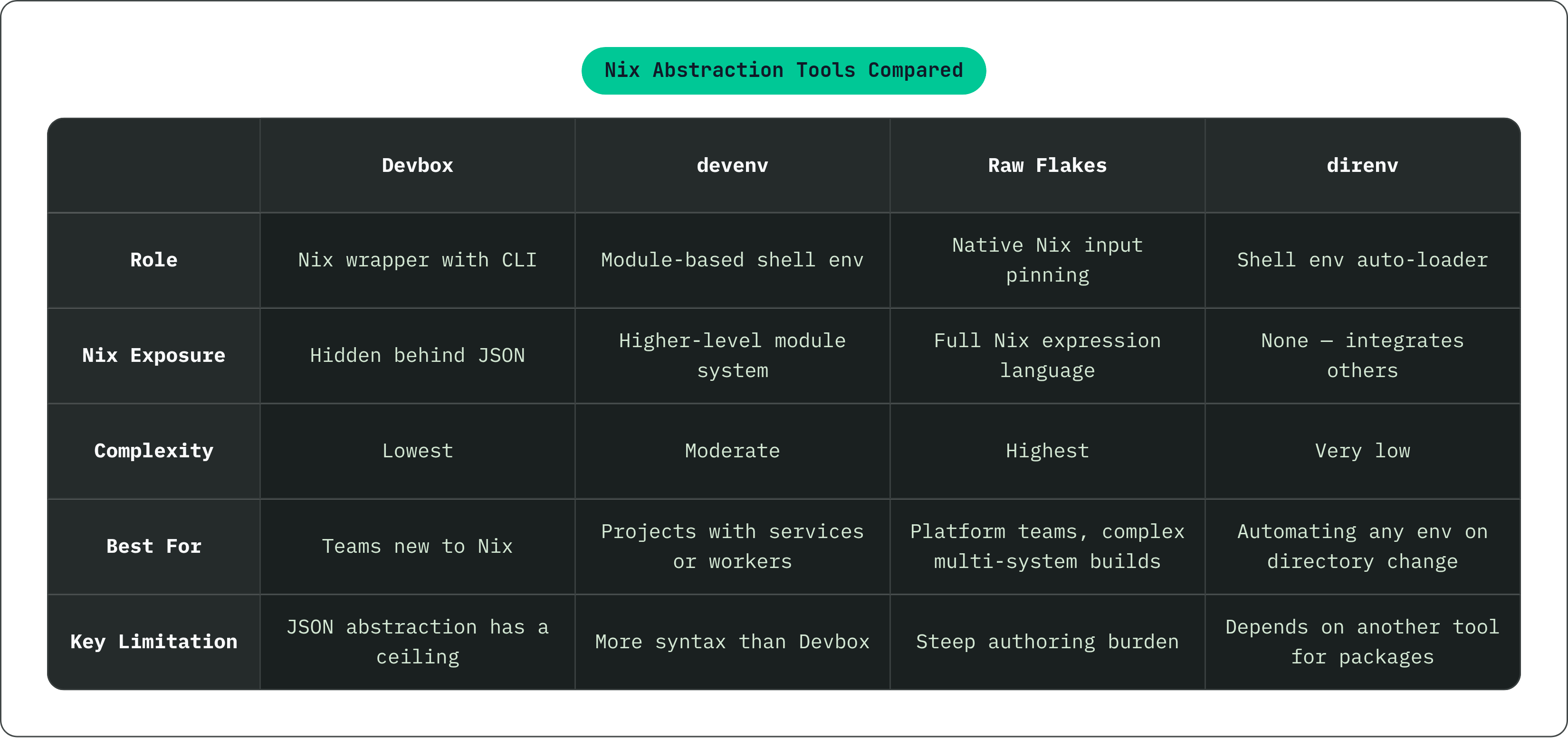
All four sit on top of Nix. What changes between them is how much of Nix they expose, who they're built for, and how they hold up across platforms.
Devbox, from Jetify, hides Nix behind a JSON file and a CLI that feels ordinary: devbox add nodejs@20 instead of hand-writing a derivation. Nix does the reproducibility work underneath; Devbox handles the developer experience on top, pulling packages straight from Nixpkgs. It can generate a devcontainer.json, bridging the Nix world and the Dev Containers world for teams that want both, and the same devbox.json that runs locally can drive CI. For once, the pipeline environment and the laptop environment are actually the same thing. The catch is that the JSON abstraction has a ceiling, and teams that eventually need the full Nix expression language will hit it.
devenv.sh builds on nix-shell and direnv, and exposes a higher-level module system rather than raw Nix syntax. It draws from a large prebuilt package set spanning Linux and macOS, x64 and ARM64, with WSL2 supported too. Worth flagging: with Nix evaluation caching turned on, devenv activates in under 100 milliseconds. Doesn't sound like much until you're the one waiting on it fifteen times a day. It can also spin environments up inside containers through a built-in command, giving it a foot in both the Nix and container camps. It asks more of you syntactically than Devbox does, but it handles complex service setups, databases, background workers, more gracefully as a result.
Raw Nix Flakes sit at the far end. A flake.lock pins every input with the most precise reproducibility guarantee the ecosystem has to offer, but it demands the most from whoever writes it. That tradeoff makes flakes the right call for platform teams composing genuinely complex, multi-system environments, and probably the wrong call for a five-person startup that just wants Node and Postgres behaving the same way on everyone's laptop.
direnv fills a supporting role. It's the glue that lets the other tools disappear into the background: a shell extension that loads and unloads environment variables as you move in and out of a directory, plugging into Nix, devenv, and other tools through a.envrc file that fires automatically on cd. Nobody has to remember to type nix develop. Tools people have to remember to use are tools people eventually stop using, and that pattern shows up reliably whenever a setup step sits outside the normal workflow.
Devbox asks the least of you and gets you moving fastest. devenv adds service-awareness for a bit more upfront complexity. Raw Flakes hand you total control in exchange for total responsibility.
Shell-level and language-specific version managers and where they fall short
Tools like asdf, mise, pyenv, nvm, and rbenv sit in a different, older category. They manage language runtime versions per project, usually through a .tool-versions file or something similar, and they've been around long enough to feel like the default answer to all of this.
Their appeal is real. No container to build, no Nix language to learn, and they run on macOS, Linux, and WSL2 with almost no setup. Per-directory version pinning means one project runs Node 18 while another runs Node 22, with no conflict and no manual switching between them.
Still, they manage the runtime and nothing else. Two developers can have identical .tool-versions files and still be running different versions of OpenSSL or libpq underneath, and that file does nothing to catch it. Compilation still happens on the host OS, so a native package that builds cleanly on Ubuntu can fail, or quietly produce different binaries, on macOS or on ARM versus x86_64. Version numbers are strings, not content hashes, so a registry could technically serve different content under an identical version tag and nothing in the toolchain would notice. There's no provenance trail, no SBOM output. The dependency graph exists somewhere, but it's implicit, and nobody can audit what they can't see.
None of that makes these tools bad. It makes them right for a specific situation: a small team, a mostly uniform OS environment, light security requirements. Once a team needs CI environments that actually match developer laptops, or needs an auditable dependency trail for a security review, version managers stop being enough on their own.
How WSL2 changes the calculus for Windows-based development teams
WSL2 runs an actual Linux kernel inside a lightweight Hyper-V virtual machine, without translation or emulation. The Linux tooling covered above, Nix included, runs on it about as well as it runs on a native Linux box.
The one trap that catches nearly everyone is filesystem location. Keep a repo on the Linux-side virtual disk inside WSL2, and performance is strong. Access a Windows-side path, anything under /mnt/c/, from inside WSL2, though, and performance drops off a cliff. This single mistake, cloning into the wrong filesystem, is probably the most common reason people decide WSL2 is slow, when the real problem is just where they put the repo. CPU and RAM allocation happen automatically, and storage resizes on its own, which at least removes the manual disk-sizing headache that used to come bundled with running a full VM.
For reproducibility tooling specifically, the picture is good. Devbox and devenv run on WSL2 without modification, because the Linux kernel WSL2 hands over is genuinely sufficient for Nix to do its work. Dev Containers work too, through Docker Desktop or a comparable runtime on the Windows side, and direnv activates normally inside a WSL2 shell, same as it would on native Linux. Where things still get rough is GUI tooling, direct hardware access like USB or serial devices, and a handful of Docker networking edge cases. That's exactly where the seam between Windows and Linux is thinnest, and it still occasionally shows.